
Not financial advice. This is software that reads public data and does arithmetic. It can't predict the market. Most people who day trade lose money. Start with paper trading, and decide for yourself.
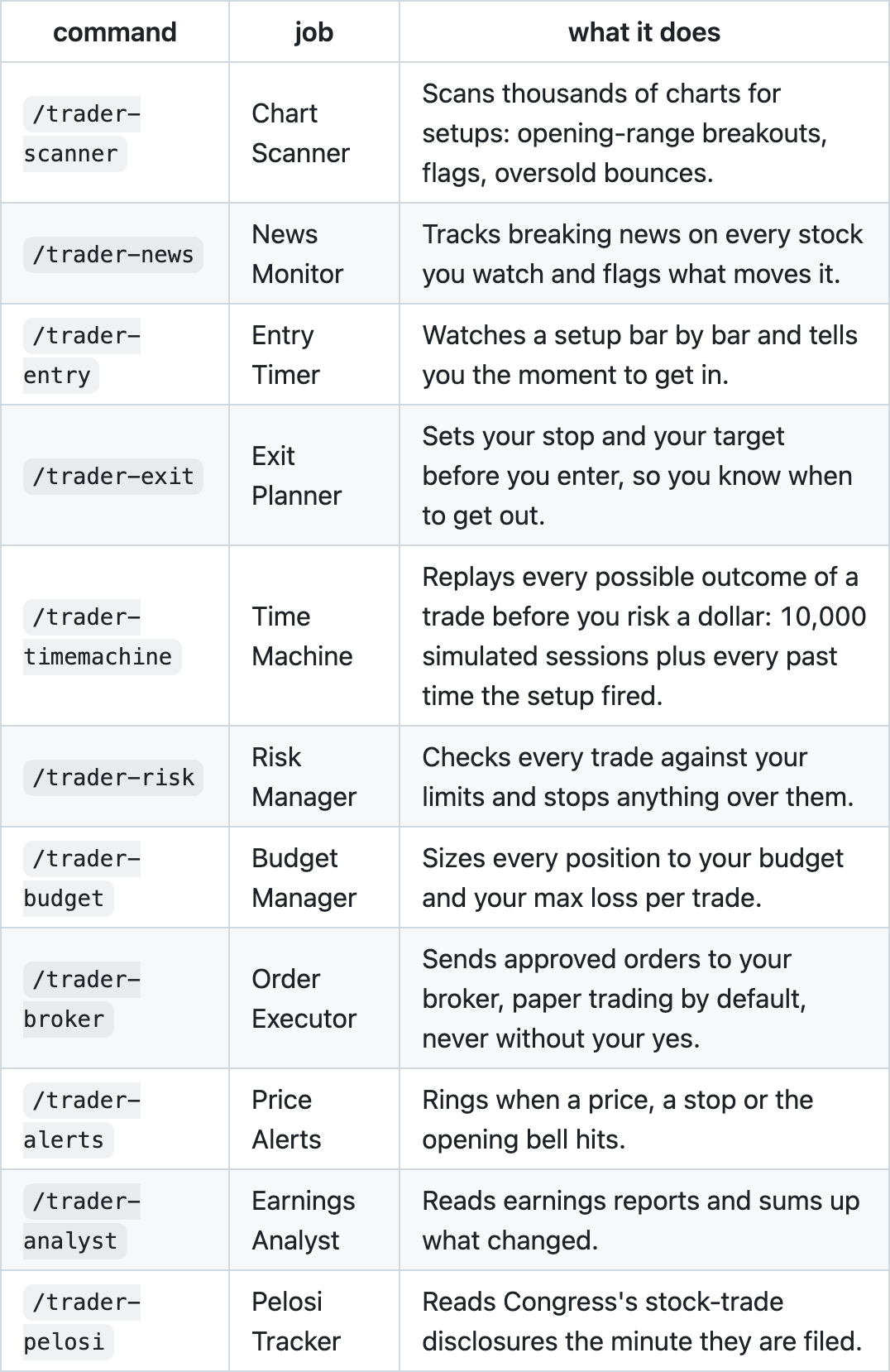
The Day Trader Skill is a free, open-source pack of 11 Claude skills that help you research and plan a day trade. It scans charts, checks breaking news, times your entry and exit, sizes your position, and runs the Time Machine: 10,000 simulated sessions of your trade before you put money in.
- GitHub: https://github.com/Jakeschincariol/day-trader-skill
- Free, MIT license, no signup, no API key. The tools are plain Python that read free public data (Yahoo Finance charts, Nasdaq Trader symbol lists, SEC EDGAR, the House Clerk).
Setup takes about 10 minutes.
What you need
| What | Check it's installed | |
|---|---|---|
| 1 | Claude Code (the terminal app or the desktop app) | claude --version |
| 2 | Python 3.8 or newer (nothing to pip install) | python3 --version |
| 3 | Git (to download the skills) | git --version |
| 4 | Optional: a Moomoo account, to send paper orders |
If Python or Git says "command not found":
Mac (needs Homebrew):
brew install python git
Windows (PowerShell):
winget install Python.Python.3.12
winget install Git.Git
Then close and reopen your terminal.
Don't have Claude Code yet? Get it at https://claude.com/claude-code.
Step 1: Install the skills
The easiest way is to paste this into Claude:
https://github.com/Jakeschincariol/day-trader-skill

install skill
Or install it as a plugin in Claude Code, one line at a time:
/plugin marketplace add Jakeschincariol/day-trader-skill
/plugin install day-trader-skill@day-trader-skill
As a plugin, the commands show up as /day-trader-skill:trader-scanner and so on. If you'd rather type plain /trader-scanner, copy the folders in instead:
git clone https://github.com/Jakeschincariol/day-trader-skill.git
cp -r day-trader-skill/trader-* ~/.claude/skills/
Then quit Claude Code and open it again.
Check it worked: type /trader in Claude Code. You should see all 11 commands, from /trader-scanner to /trader-pelosi.
Step 2: Set your rules
Each skill reads and writes a trader/ folder in your project, so make a project folder for your trading:
mkdir my-trading && cd my-trading
claude
Then tell Claude your limits in plain English:
Set my rules: $100 budget, max $5 loss per trade, max $10 loss per day, paper trading.
Claude saves them to trader/config.json. These are the settings that matter most:
| Setting | What it does | My $100 test |
|---|---|---|
budget |
How much the pack may use | 100 |
max_loss_per_trade_usd |
The most you can lose if a stop is hit | 5 |
max_daily_loss_usd |
Stops new trades for the day after this | 10 |
max_trades_per_day |
Trades per day | 3 |
flat_by |
Close everything by this time (New York) | "15:55" |
paper |
Paper trading (fake money) | true |
sec_user_agent |
Your name and email, required by SEC EDGAR | "Your Name you@example.com" |
The SEC asks every app that reads its filings to say who it is. Put your own name and email in
sec_user_agent, or the news and earnings tools can't read 8-K filings.
Step 3: Connect Moomoo (paper trading)
This step is optional. Without it, the pack still scans, plans and sizes trades. It just prints a ticket instead of sending it.
1. Add Moomoo's official MCP server. Paste this into your terminal:
claude mcp add moomoo-mcp --scope user --transport http https://mcp.moomoo.com/mcp
2. Sign in. Open Claude Code, type /mcp, pick moomoo-mcp and log in with your Moomoo account in the browser window that opens.
3. Point the pack at Moomoo. Ask Claude:
Use moomoo for my broker, paper account. Show me my paper accounts so I can pick one.
Claude adds a moomoo block to trader/config.json and fills in your paper account ID.
4. Lock real money out. Add this to ~/.claude/settings.json (merge it with what's already there). It blocks Moomoo's real-money order tools and makes Claude ask before every paper order:
{
  "permissions": {
    "deny": [
      "mcp__moomoo-mcp__trading_order_place",
      "mcp__moomoo-mcp__trading_order_replace",
      "mcp__moomoo-mcp__trading_order_cancel",
      "mcp__moomoo-mcp__trading_order_confirm",
      "mcp__moomoo-mcp__crypto_account_create_order",
      "mcp__moomoo-mcp__crypto_account_modify_order",
      "mcp__moomoo-mcp__crypto_account_cancel_order"
    ],
    "ask": [
      "mcp__moomoo-mcp__sim_trade_input_order",
      "mcp__moomoo-mcp__sim_trade_modify_order",
      "mcp__moomoo-mcp__sim_trade_cancel_order"
    ]
  }
}
How the safety net works:
- A ticket you say yes to gets one more Allow once / Deny check from Claude, then goes to your Moomoo paper account.
- Real-money order tools are blocked in settings, so they never get that far.
Good to know about Moomoo:
- Paper only. Through Moomoo, this pack only places paper orders. Its real-money order tools stay blocked on purpose.
- No stops at the broker. Moomoo paper takes plain market and limit orders, so your stop and target live in the plan. Price Alerts watches them and rings when one hits, then you close the trade.
- Buy/sell codes. The pack won't guess Moomoo's buy and sell codes. Claude asks you to confirm them once, for example from a paper order you place yourself in the Moomoo app. Until then every ticket says NOT READY.
Prefer Alpaca or Interactive Brokers?
/trader-brokercovers both. Ask Claude "set up paper trading with Alpaca".
Step 4: Plan your first trade
Every skill reads what the one before it wrote, so a full trade goes in this order:
Scanner → News → Entry → Exit → Time Machine → Budget → Risk → Broker → Alerts
You don't need to remember the commands. Just ask in plain English.
1. Find setups: /trader-scanner
Scan the market for opening-range breakouts.
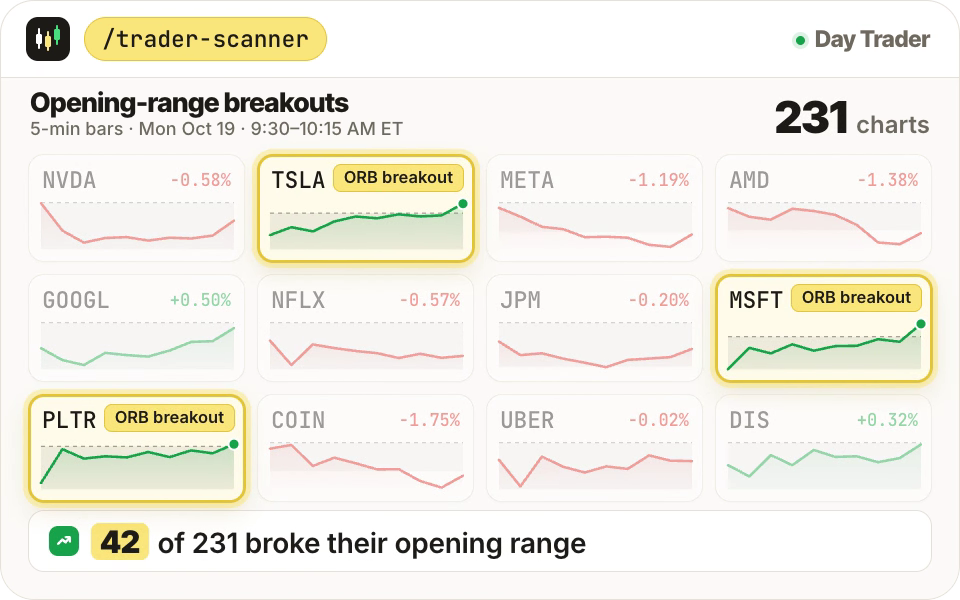
It scans thousands of US stocks for setups like opening-range breakouts, bull flags and oversold bounces, then saves a watchlist.
2. Check the news: /trader-news
Any news on TSLA?
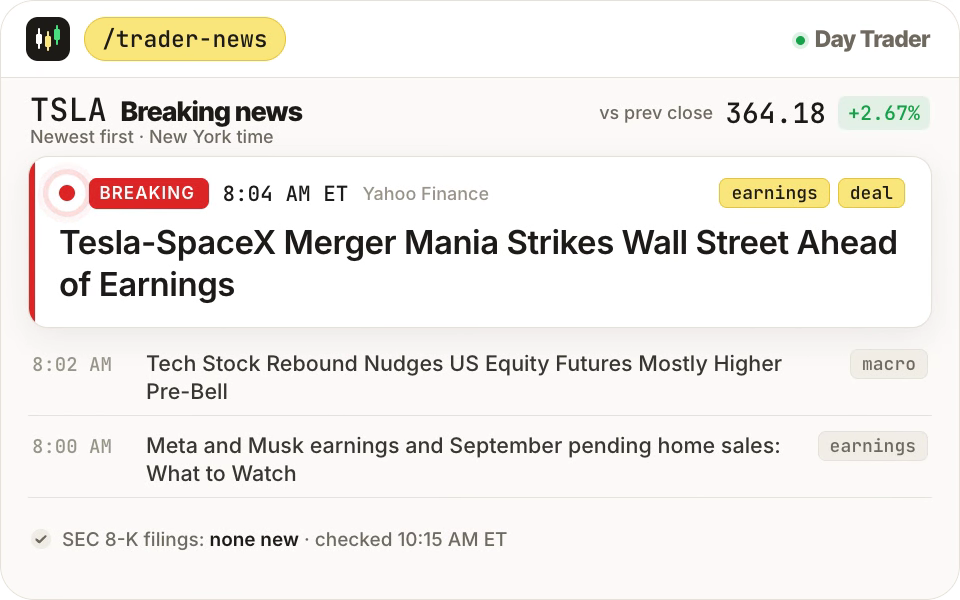
You get headlines and SEC 8-K filings for every stock you watch, newest first and tagged (earnings, deal, analyst, halt...). It also tells you if a company reports earnings this week.
3. Time your entry and exit: /trader-entry and /trader-exit
Tell me when to get in on TSLA, then set my stop and target.
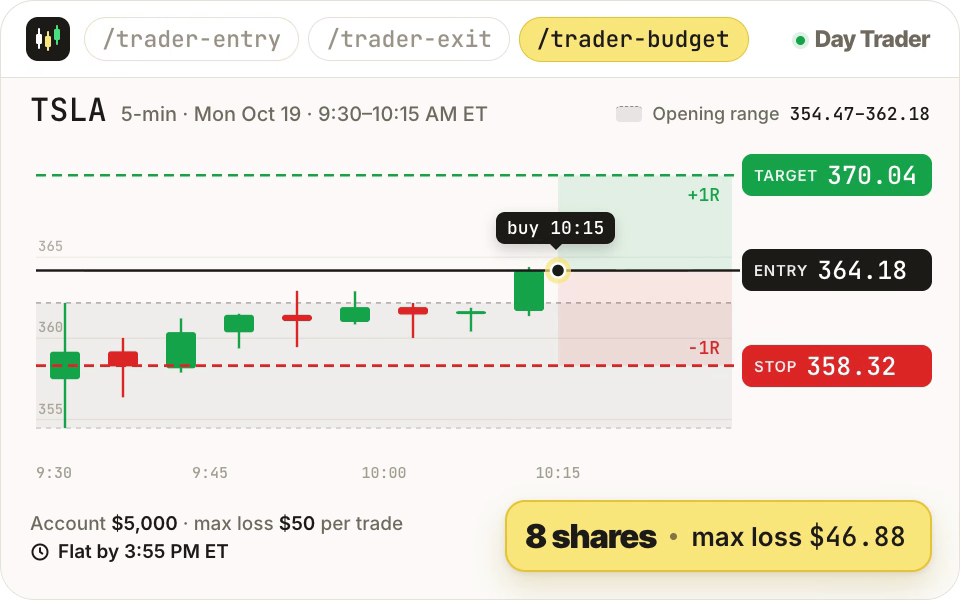
The entry timer watches bar by bar and says triggered at the first close above the range. Then the exit planner sets your stop and your target before you buy.
4. Run the Time Machine: /trader-timemachine
The craziest one. Say you plan to buy at $10, take profit at $11, or cut your loss at $9:
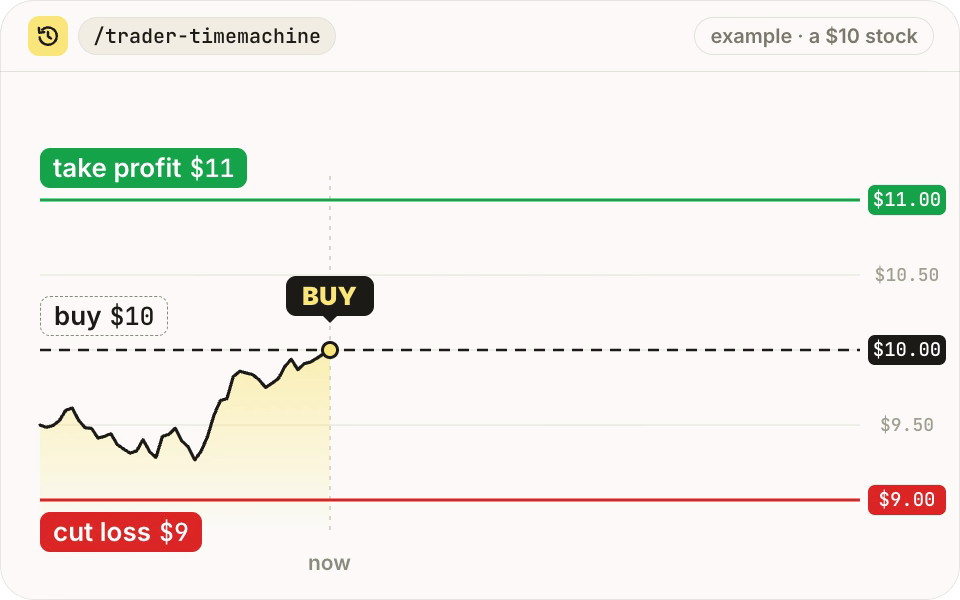
Run the time machine on this trade.
Before you put money in, it uses the stock's own recent price movements to simulate 10,000 ways the rest of the day could play out:
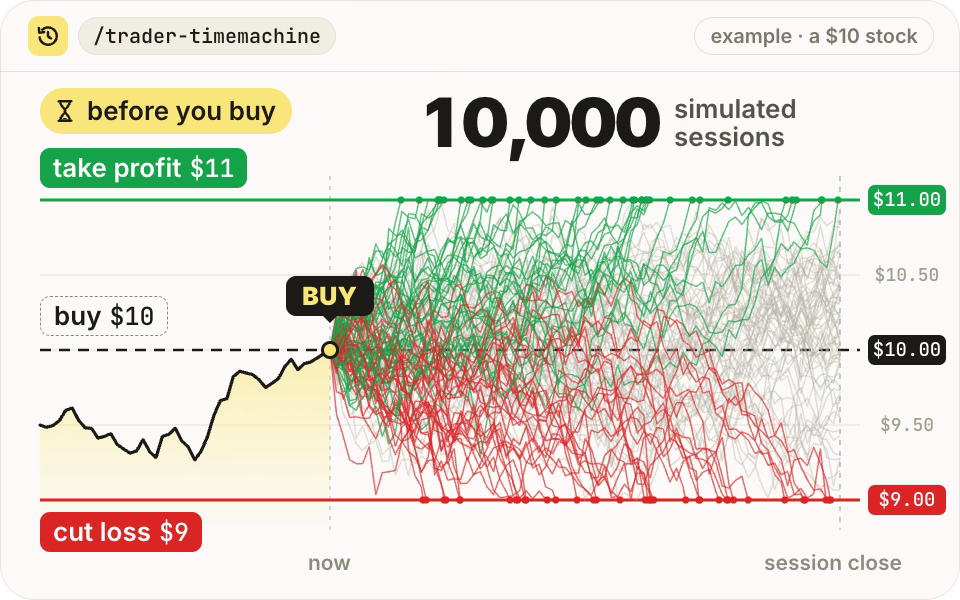
Then it shows how often the price hit your profit target first, hit your loss limit first, or neither before the session ended:
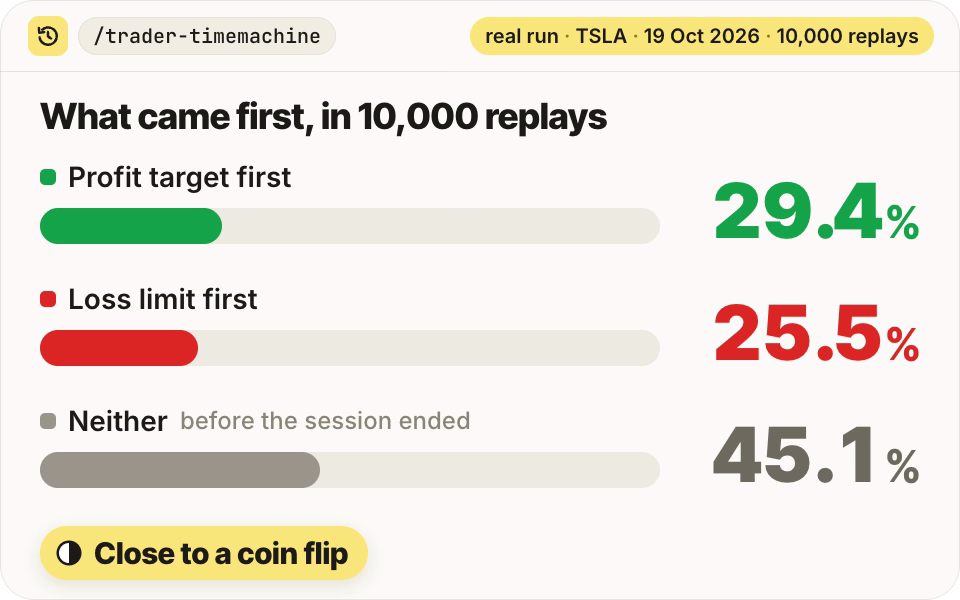
The bars above are a real run: TSLA, 19 Oct 2026, from the repo's example.
It also re-runs the same rule on every past session where the setup fired. This is historical simulation and backtesting:
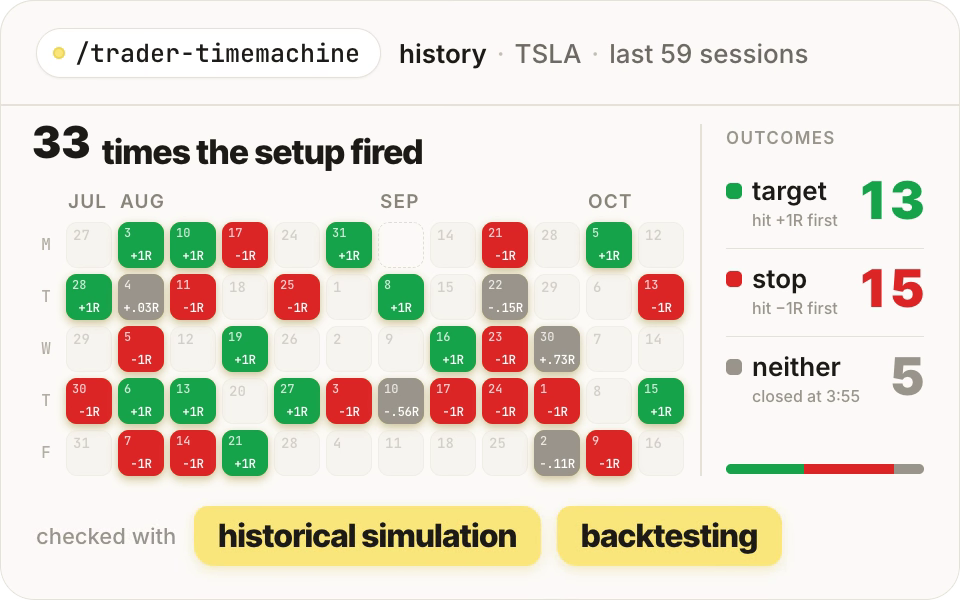
It can't predict the market. But it gives you more than a gut feeling to go on.
5. Size it and check it: /trader-budget and /trader-risk
How many shares can I buy?
Check my order.
The budget manager finds the number of whole shares that fits your max loss and budget. If the stop is too far away for your limits, it says no instead of shrinking the trade. The risk manager then prints PASS or BLOCK with the reason.
6. Place it, only with your yes: /trader-broker
Place the order.
Claude shows the ticket in plain words and waits for you to type yes. Then Claude's own Allow once / Deny card asks a second time. Nothing in the pack can place an order on its own.
7. Watch it: /trader-alerts
Watch my stop and target, and remind me to close by 3:55.
It rings once when your stop, your target or the "flat by close" time hits.
Bonus tools
| Command | What it does | Try |
|---|---|---|
/trader-analyst |
Reads a company's earnings straight from SEC filings and sums up what changed | "How did Tesla's earnings look?" |
/trader-pelosi |
Tracks the stock trades members of Congress must disclose | "What is Pelosi buying?" |
The fine print
- Paper first.
"paper": trueis the default. Practise there before real money. - A stop is a plan, not a guarantee. In a fast market or across a gap, the price can blow past your stop.
- The Time Machine is a simulation, not a prediction. Earnings, halts and headlines can do things the last 60 days never did.
- Not financial or tax advice. Talk to a licensed professional if you need advice.
If it doesn't work
- You don't see the /trader commands: quit Claude Code completely and reopen it. If you installed it as a plugin, the commands start with
/day-trader-skill:. - "python3: command not found": install Python (see "What you need" above), then reopen your terminal.
- The news or earnings tools say the SEC refused: put your real name and email in
sec_user_agentintrader/config.json. - Prices look a few minutes old: the free Yahoo data can lag. Check anything important against your broker before you act.
- Moomoo tickets say NOT READY: the pack still needs your paper account ID or the buy/sell codes. Ask Claude "what's missing for my moomoo ticket?"
To check the install works offline:
cd day-trader-skill
python3 -m unittest discover -s tests -v
Day Trader Skill is an open-source project by Jakeschincariol (MIT license), not an official Anthropic product. All credit to them. I'm testing it over the next few days — follow @hohjd.ai to see how it goes, and tag me if you try it.